AprilTag and ArUco markers: fiducial markers and how robots use them
When a robot perceives its surroundings, it often needs to know where objects are and where it stands relative to them. For example, to find its charging station, locate a part it has to pick up or identify a work area.
One of the cheapest options for this is a 2D camera. However, images give us pixels, not distances or positions in space.
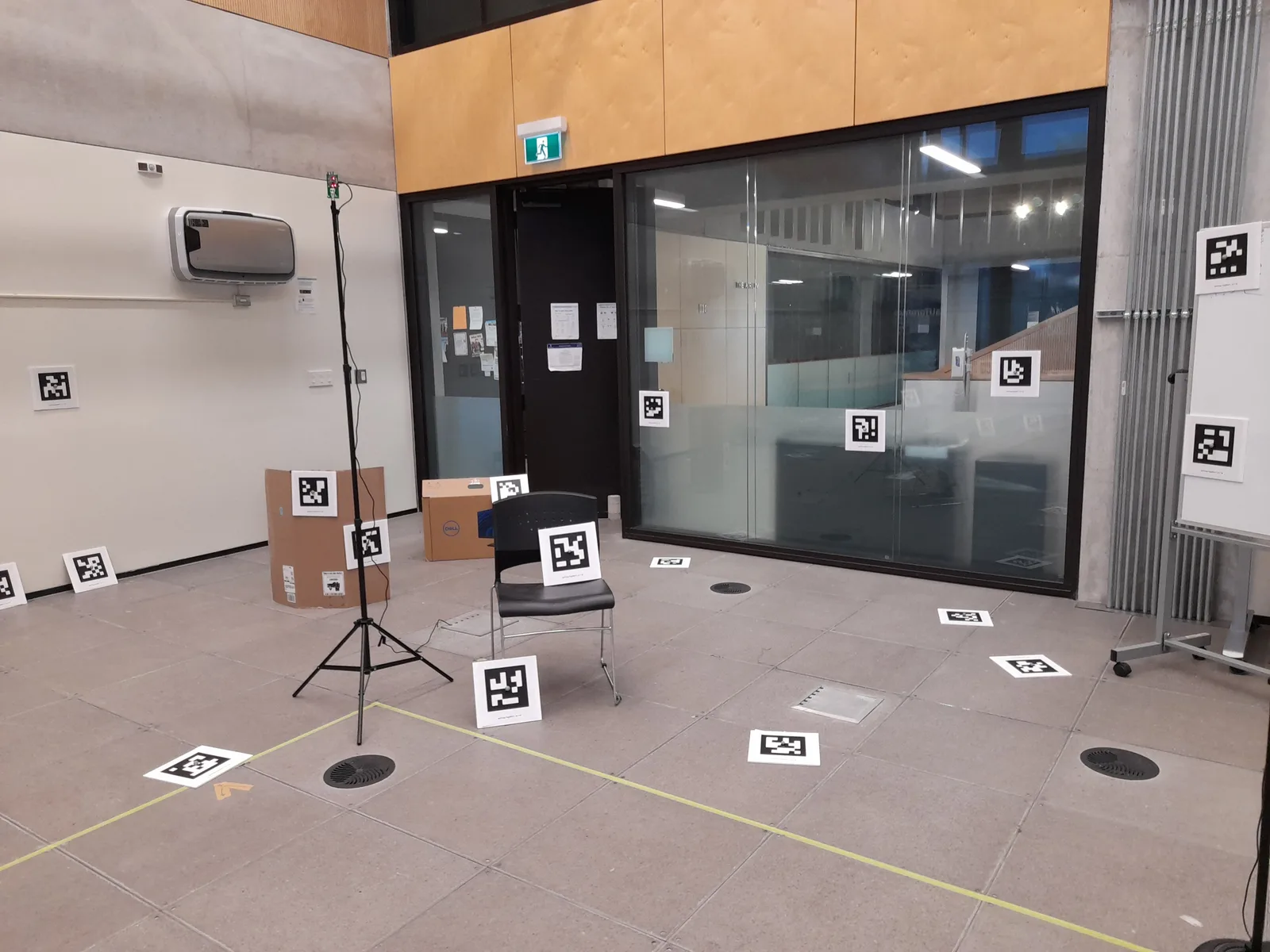 A lab room instrumented with markers: each one is a reference with a known identity and position. Photo: STAR-loc dataset, CC BY 4.0.
One way to solve this is with fiducial markers: images similar to QR codes, with patterns designed to be detected by vision algorithms.
Knowing the size of the marker and using a calibrated camera, we can estimate its position (x, y, z) and orientation (roll, pitch, yaw) relative to the camera. In addition, each pattern contains an ID that identifies the marker and lets us use it as a reference point.
There are different kinds of fiducial markers; the most common are AprilTag and ArUco, each with several families of patterns.
What a marker is
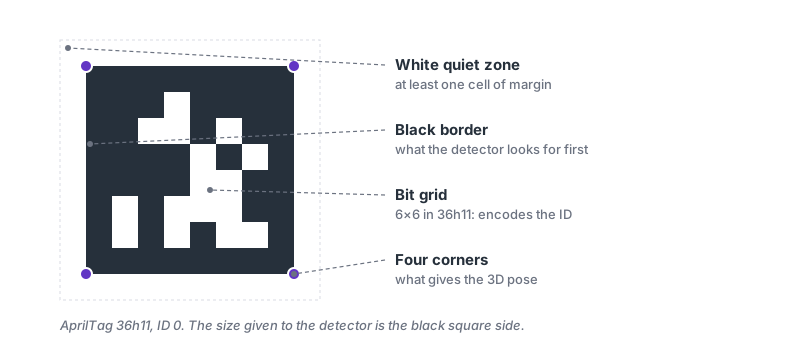
A fiducial marker looks like a QR code, but it is much simpler. Instead of storing text, it stores a small number that identifies it, and it is designed to be detected from far away and measured precisely, not to be read up close.
A marker has three parts, and each one has a job:
- The black border. It is the first thing the detector looks for, because it stands out from far away and at an angle, before the bits can be read.
- The bit grid. The black and white cells inside. For example, in AprilTag's 36h11 family the grid is 6 × 6 cells, and its pattern encodes the marker's ID.
- The white zone around it. It must be at least one cell wide. Without it, the black border blends into the background and the detector cannot find it.
What we actually use for measuring are the four corners of the border. From their position in pixels, the real size of the marker and the camera calibration, we can compute where the marker is in space. That is why a bent, glossy or partly covered marker gives a wrong position, or none at all.
The bits are not simply the ID written in binary, but an error-correcting code. In the 36h11 family there are 36 bits and any two valid IDs always differ in at least 11 of them. If lighting or blur flips a few bits, the detector can correct them or discard the reading, but it does not return a wrong ID. This is what makes it safe to trust a marker to move a robot.
The two most widely used types are AprilTag, developed at the University of Michigan and common in ROS 2, and ArUco, developed at the University of Córdoba and included in OpenCV. Both are detected with the same kind of algorithm, and OpenCV can read both. There is also the ChArUco board, which is not a marker but a chessboard with an ArUco in each white square; it is the usual choice for calibrating cameras.
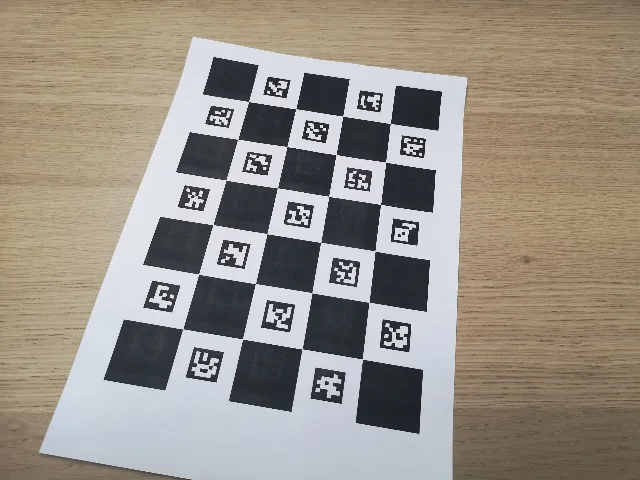 A printed ChArUco board: the chessboard provides the corners and the ArUcos identify each one. Photo: OpenCV, Apache-2.0.
From pixels to 3D coordinates
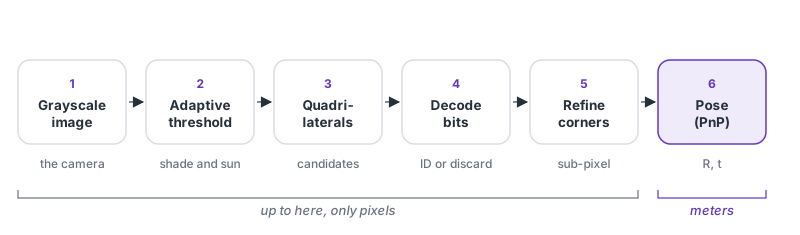
Detection uses classical computer vision, with no neural networks, so it runs in real time on an ordinary processor. The detector converts the image to grayscale, applies an adaptive threshold to separate light from dark even when the lighting is uneven, looks for four-sided shapes, rectifies the inside of each one and reads its bits. If the result matches a valid ID, it refines the corner positions to better than a pixel. Up to this point everything happens in the image: the detector returns an ID and four corners in pixels.
What a pose is
Imagine a line coming straight out of the center of the camera lens. The marker's pose is six numbers measured relative to that line: how far ahead it is, how far to the side and how far up, plus how it is rotated about each of the three axes. With this information the robot knows where to go and how to arrive oriented. A closer or larger marker covers more pixels, and so it gives a more precise pose.
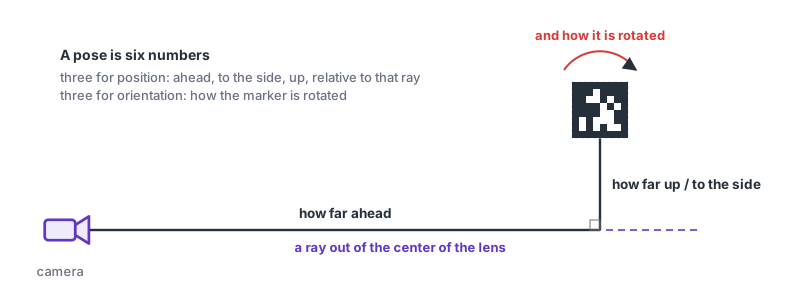
From the corners to the pose
A calibrated camera projects each point in space to an image pixel according to
where describes the lens (the intrinsic parameters) and and are the rotation and translation between camera and marker, that is, the pose. The corners have known coordinates on the marker, because it is a square of side , and measured coordinates in the image. Finding and from those correspondences is the problem known as PnP. For a flat square marker the IPPE method is used, available in OpenCV as SOLVEPNP_IPPE_SQUARE.
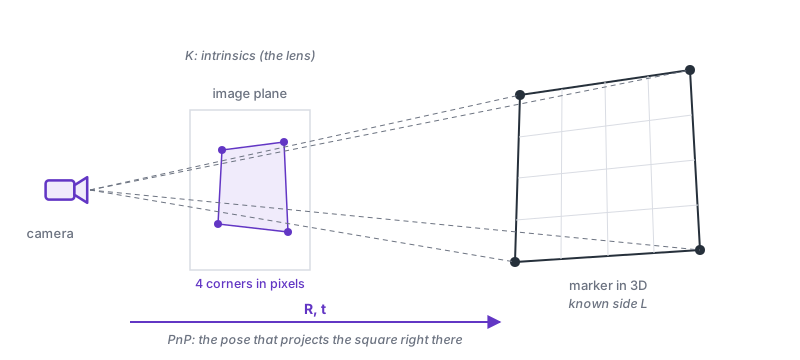
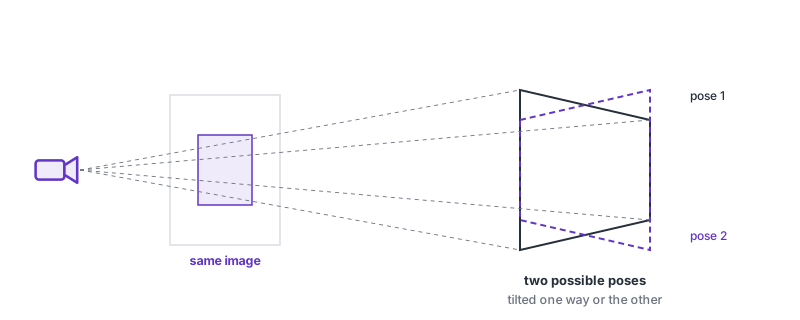
The planar ambiguity
When the four points lie on one plane, two different poses can produce almost the same image. A marker tilted to the left and one tilted to the right look practically the same when seen head-on at medium distance. This is not a flaw in the algorithm but a consequence of the geometry. IPPE returns both solutions with their reprojection error; when they are similar, the orientation can flip from one to the other between frames. The way to avoid it is to place markers that are not on the same plane, or to rely on another source of information, such as odometry, a second marker or a second camera.
Accuracy and calibration
Position is estimated well at short range and degrades as the marker gets farther away, because it covers fewer pixels. Orientation is the delicate part: head-on, because of the planar ambiguity, and at steep angles, because corner noise turns into degrees of error. None of this works without calibrating the camera, either. Without the intrinsic parameters and the lens distortion, the detector finds the corners correctly but converts them to meters with a lens model that is not the real one. Calibration is done once per camera and resolution, with a ChArUco board and several photos from different angles.
There are also situations where detection fails or misleads: motion that blurs the corners, a reflection on a cell, a bent marker or one on a curved surface, a covered corner, or a declared size that does not match the printed one. For example, a marker printed at 97 % of its size gives distances 3 % too short, always and without any warning. So before letting a pose move a motor, it is worth checking that the reprojection error is low and stable, that distance and angle are within the expected range, that there are no jumps between frames, and that the pose is expressed in the frame the controller expects.
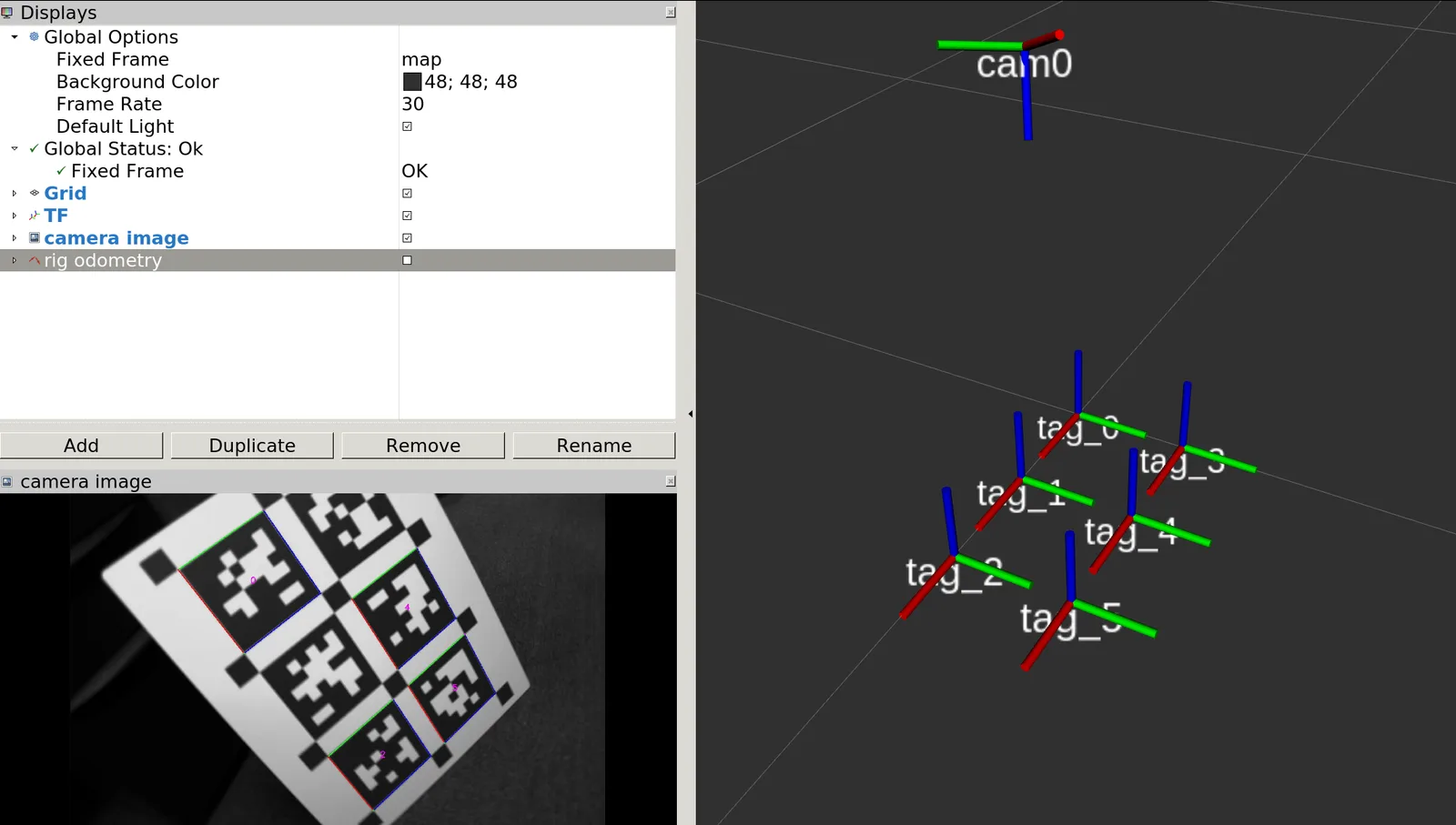 What the detector delivers: each marker with its ID and its three axes, already in meters. Screenshot: TagSLAM, Apache-2.0.
From the marker to the robot
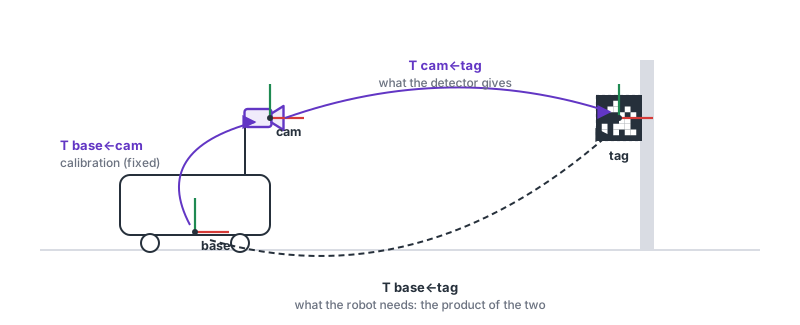
The detector returns the marker's pose relative to the camera, . What the robot needs, however, is the marker's position relative to its own base. To get it, the two transformations are composed:
In ROS 2 this chain of transformations is handled by tf2. The camera publishes its image together with its calibration, the detector publishes one frame per marker, and whatever consumes it, for example Nav2's docking, localization or the arm planner, asks for the transformation it needs with its timestamp. A frequent mistake is in the axes: the camera's optical frame looks along , while the robot's body frame looks along . Also, the marker's axis points into the marker in AprilTag and out of it in ArUco. Before combining two poses it is worth confirming which frame each one is in.
Hand-eye calibration
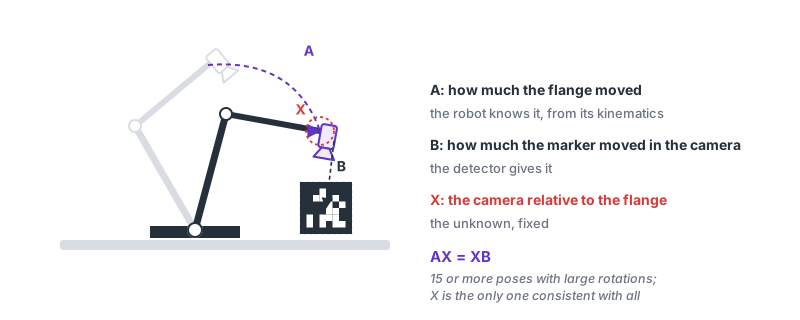
When the camera is mounted on the wrist of an arm, the fixed transformation between the camera and the robot flange has to be known, and it is not something you can measure with a ruler. It is solved by posing the equation : the arm goes through several poses; at each one the flange motion, which the robot knows, and the marker motion seen by the camera are recorded, and is the only transformation consistent with all the pairs. OpenCV solves it with calibrateHandEye and MoveIt integrates it in RViz. For this calibration the marker should be close and facing the camera.
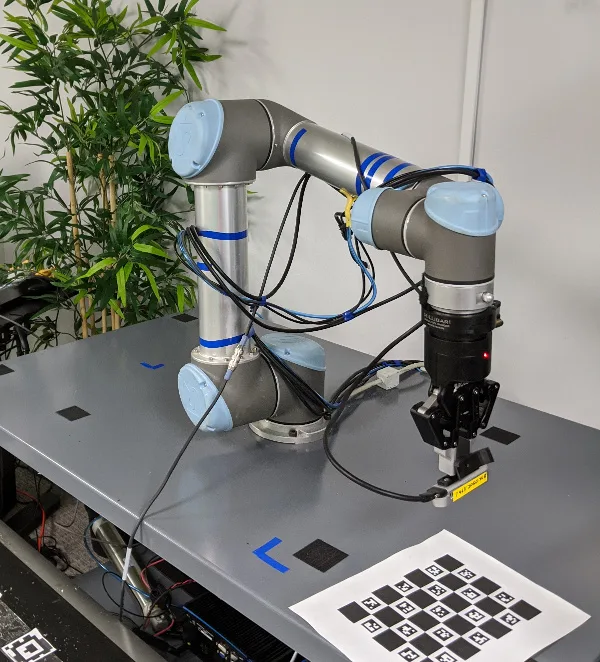 The real setup: camera on the wrist and board fixed on the table. Photo: MoveIt, BSD-3.
Several markers
With a map where the pose of each marker is known, each frame is solved as a single PnP problem using all the visible corners. If the map does not exist, TagSLAM builds it by optimizing the robot poses and the marker poses at the same time. More markers is not always better: a distant or steeply tilted one adds more noise than information, and one mismeasured in the map drags the others. What helps are markers that are clearly visible and placed on different planes.
From the marker to the action
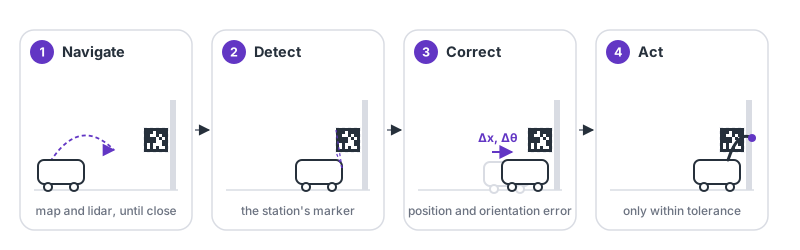
The reprojection error, that is, the difference between where the corners should fall according to the computed pose and where they were detected, is the confidence indicator. If it grows, something is wrong: the calibration, the declared size or a bent marker. With a trustworthy pose, the typical workstation case always follows the same steps:
- The robot navigates to an approximate area using its map and its lidar.
- It detects the station marker.
- It estimates the error in position and orientation relative to where it should be.
- It corrects its position, checks that it is within tolerance, and only then acts.
In manipulation the marker is usually used twice. A fixed camera on the robot base gives an approximate pose and the arm approaches; then a wrist camera sees the marker again and corrects in closed loop down to the final position.
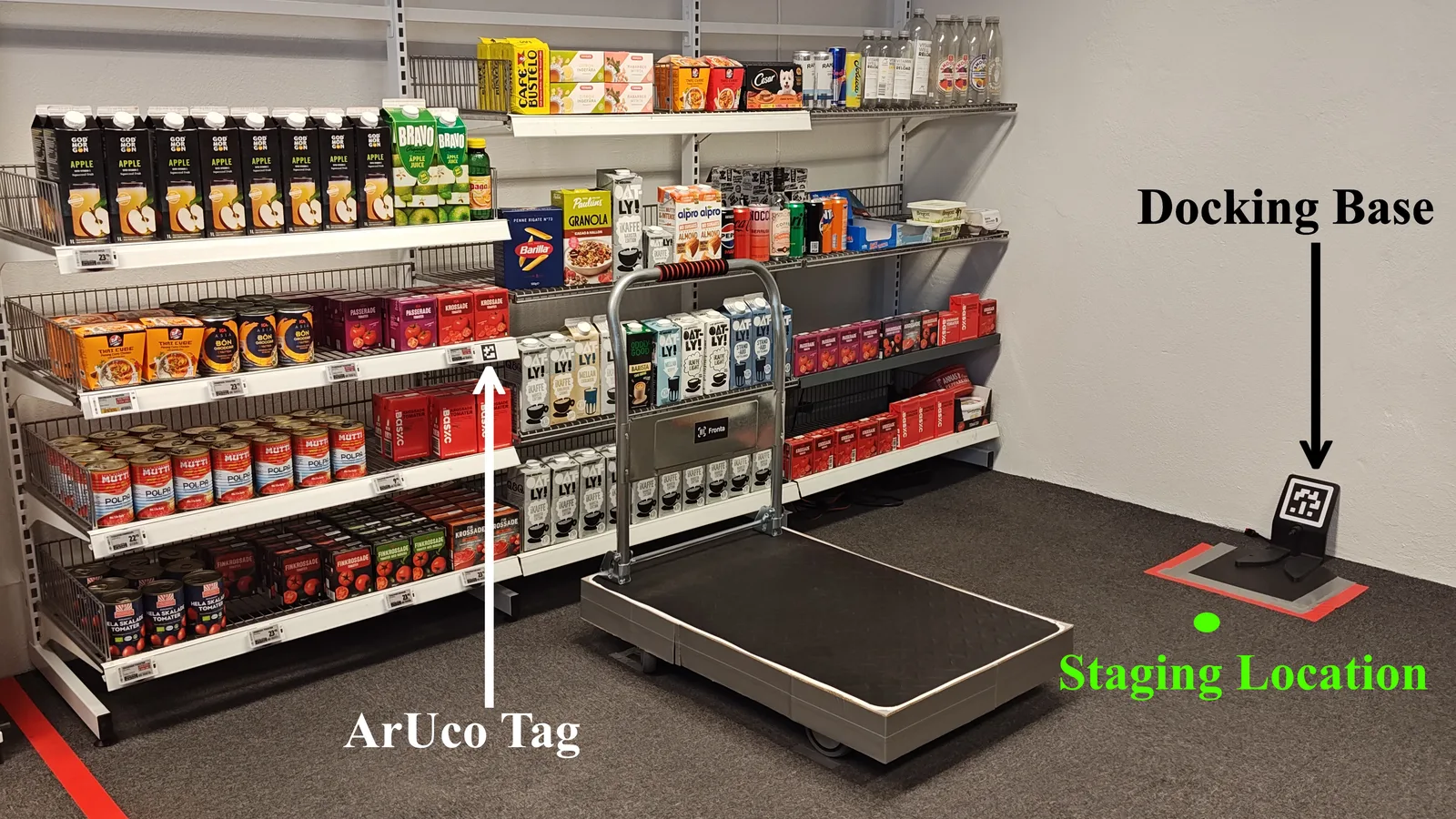 A real station: one marker on the shelf for the part and another on the floor for docking. Photo: From Pixels to Shelf, CC BY 4.0.
Placement strategies
Eight ways to place markers, what each one solves and where it breaks.
ASingle marker
- What it solves:
- Give a camera a reference with known identity and size: where a part, a station or the robot is relative to it.
- Principle:
- Four pixel corners and the physical size are enough to solve the pose (PnP, usually IPPE for planes).
- Advantage:
- Simplest and cheapest; a single transform to publish in tf2.
- Limit:
- Seen head-on the orientation is ambiguous (two near-identical poses) and one pixel of noise flips it. Depth error grows with the square of distance.
- Documented example:
- Spot uses a single 146 mm AprilTag 36h11 per dock and per mission initialization point.
BSeveral markers on one plane
- What it solves:
- More points, more robustness to occlusion and noise, with nothing to build in 3D: boards, tables, walls.
- Principle:
- All visible corners go into one PnP (EPnP); if one is covered, the rest hold the solution.
- Advantage:
- Better translation accuracy than a single tag and partial detection tolerated. It is the logic of the ChArUco board and of competition fields with 16 AprilTags.
- Limit:
- Still a plane: the head-on orientation ambiguity does not fully disappear, and a far or steeply angled marker can add more noise than it contributes.
- Documented example:
- PhotonVision MultiTag solves the robot pose with all visible AprilTags of the FRC field at once, using their known layout.
CRigid bundle
- What it solves:
- Treat several markers as one object with a common reference frame (the dock, the station, the fixture).
- Principle:
- Relative poses between markers are measured once (bundle calibration) and then every frame estimates the pose of the set from all visible corners.
- Advantage:
- One stable pose even with missing markers; the output does not switch frames when the visible marker changes.
- Limit:
- If the bundle geometry is mismeasured, the whole system inherits that error; apriltag_ros solves it with a calibration script and TagSLAM by optimizing it with everything else.
- Documented example:
- apriltag_ros defines tag bundles with each tag pose relative to the bundle frame; Stretch 4 docks with three 50 mm ArUco markers on its station.
D3D arrangement
- What it solves:
- See the object from any side and remove orientation ambiguity.
- Principle:
- Markers on different faces of a prism or cube: the points are no longer coplanar, and PnP with non-coplanar points has a unique solution.
- Advantage:
- Complete pose without flips while two faces are visible; the object is tracked while rotating.
- Limit:
- The piece must be built and calibrated; every tagged face takes space on the object.
- Documented example:
- The "fiducial exoskeleton" (2026) mounts a tag on each link of a low-cost arm and recovers each link's pose and the joint angles from a single RGB image.
EAsymmetric arrangement
- What it solves:
- Let the layout itself say which side is which, even if one marker cannot be read.
- Principle:
- Three on top and two below, or an irregular triangle: no rotation of the set matches itself, so the relative geometry confirms identity and rejects false positives.
- Advantage:
- Redundancy and mutual verification: if a marker is misread, its position relative to the others gives it away.
- Limit:
- It is a variant of the bundle (C): it needs the same geometry calibration, and the markers farther from the camera contribute less.
- Documented example:
- Service robot docks often combine a central marker with lateral ones at different heights; Stretch 4 uses right, left and apex.
FMulti-scale
- What it solves:
- See it from far away and keep seeing it at 20 cm, when the big one no longer fits in the frame.
- Principle:
- A large marker for the approach and a small one (or a recursive one nested in the large one's hole) for the final phase; the system switches reference without losing the pose.
- Advantage:
- A distance range of more than 100 to 1 with one camera. AprilTag 3 localized a drone over a 90 cm nested tag from 0.08 to 16 m.
- Limit:
- The hand-off between markers must be in the software (which pose wins when both are visible); each one's accuracy still depends on its pixels.
- Documented example:
- The recursive tagCustom48h12 families and ArUco fractal markers; in drone landing, large tags with a small one in the center.
GDistributed in the environment
- What it solves:
- Localize the robot in a building or warehouse with an absolute, unambiguous reference, without depending on SLAM not getting confused.
- Principle:
- Each marker has a known pose in the map; seeing one gives the robot pose, seeing several refines it, and seeing one again closes the loop.
- Advantage:
- Solves the kidnapped robot at startup and identical corridors; with TagSLAM the marker map builds itself.
- Limit:
- Infrastructure to maintain: if someone moves a marker, the map lies. That is why MiR, OTTO or Seegrid sell marker-free navigation and use them only at docks.
- Documented example:
- Spot GraphNav with fiducials on walls 45–60 cm above the floor; Amazon Kiva with a 2D code every meter on the floor; Monumental with localization stickers on site.
HReference for manipulation
- What it solves:
- Know exactly where the tray, fixture, tool or part is relative to the arm camera, to grasp it.
- Principle:
- The marker goes on the object or its holder; the tag pose is transformed to the robot base with hand-eye calibration, and a wrist camera refines the final approach.
- Advantage:
- Metric object pose with no training; works on textureless or translucent parts that a learned detector cannot handle.
- Limit:
- Only works for what carries a marker; any hand-eye error carries straight into the grasp. It is what FoundationPose and similar methods are starting to replace.
- Documented example:
- Stretch carries 14 mm ArUco on the gripper fingertips to see them from the head camera; MoveIt and NVIDIA hand-eye tutorials use ChArUco on the table or the wrist.
Use cases
Docking, localization in warehouses and construction sites, arm calibration, manipulation. Each photo and video carries the case behind it: what the source documents, what is inferred and what remains unconfirmed.
Photos
Real installations with the markers in view. Each with its source and license; open one for the use case.
Videos
Demos and tutorials with markers in action. The video loads only when you press play.
Docking
Autonomous Docking with AprilTags Using Nav2 - ROS 2 Jazzy
Automatic Addison
Autonomous docking tutorial: an AprilTag on the station provides the pose that the Nav2 Docking Server uses to approach and dock.
Why it is here: It is the standard ROS 2 path to dock with a marker, step by step and with the tutorial code.
Open on YouTube ›Use case: Manipulador móvil con dos UR10: docking por servo visual
Use case · Configurations: A, H
Manipulador móvil con dos UR10: docking por servo visual
Tecnalia (Sensors, 2019)
An omnidirectional base with two UR10 arms docks at workstations using a fiducial marker and proportional visual control; 29 of 30 dockings versus 14 of 30 with SLAM alone.
Documented fact
- IDS uEye GigE camera at the front; the marker pose is estimated in the camera and transformed to the base to be independent of the mounting; control loop at 20 Hz.
- Static docking: 29/30 successes (SLAM alone: 14/30). Docking onto a moving platform: error under 1 cm in about 2 s; mean errors of 9.1 mm longitudinal and 10.7 mm lateral.
- The recorded failure was due to sunlight reflected on the marker.
Technical interpretation
- The complete industrial pattern: SLAM to get close, a marker for the last centimeters, and the marker as continuous feedback rather than a one-time measurement.
Sources
Tecnalia · Outón et al., Innovative Mobile Manipulator Solution for Modern Flexible Manufacturing Processes, Sensors 2019 · CC BY 4.0 · 2026-10-18
Docking
Nova Carter - Nav2 & New Auto-Docking Server!
Steve Macenski
NVIDIA's Nova Carter docking with the Nav2 Docking Server. The nova_carter_docking package uses the Isaac ROS GPU AprilTag detector and publishes the pose of a 6-inch tag36h11 at the front of the dock.
Why it is here: Product-grade docking with a single marker and GPU detection; the ROS Discourse announcement reports over 98 % success.
Open on YouTube ›Use case: Manipulador móvil con dos UR10: docking por servo visual
Use case · Configurations: A, H
Manipulador móvil con dos UR10: docking por servo visual
Tecnalia (Sensors, 2019)
An omnidirectional base with two UR10 arms docks at workstations using a fiducial marker and proportional visual control; 29 of 30 dockings versus 14 of 30 with SLAM alone.
Documented fact
- IDS uEye GigE camera at the front; the marker pose is estimated in the camera and transformed to the base to be independent of the mounting; control loop at 20 Hz.
- Static docking: 29/30 successes (SLAM alone: 14/30). Docking onto a moving platform: error under 1 cm in about 2 s; mean errors of 9.1 mm longitudinal and 10.7 mm lateral.
- The recorded failure was due to sunlight reflected on the marker.
Technical interpretation
- The complete industrial pattern: SLAM to get close, a marker for the last centimeters, and the marker as continuous feedback rather than a one-time measurement.
Sources
Tecnalia · Outón et al., Innovative Mobile Manipulator Solution for Modern Flexible Manufacturing Processes, Sensors 2019 · CC BY 4.0 · 2026-10-18
Multiple markers
TagSLAM: SLAM based on April Tags
Shalik AI
Overview of TagSLAM, Bernd Pfrommer's package for localizing and mapping with many AprilTags and several cameras using a factor graph.
Why it is here: Shows how several markers become a jointly optimized map and trajectory instead of loose poses.
Open on YouTube ›Use case: TagSLAM: el mapa de tags se estima en vez de medirse
Use case · Configurations: C, G
TagSLAM: el mapa de tags se estima en vez de medirse
Universidad de Pensilvania (Pfrommer y Daniilidis)
A factor graph on GTSAM where every tag belongs to a body; relative poses are discovered when several tags appear in the same frame, and it also calibrates cameras with no overlapping field of view.
Documented fact
- Bodies can be static (lab) or dynamic (a block, a camera rig); tag→body poses are static and get optimized; it calibrates multi-camera extrinsics without overlap.
- The README lists "large reprojection errors" caused by wrong calibration, tag size or tag pose as error symptoms.
Technical interpretation
- It solves the practical limitation of bundles (measuring geometry with a ruler): the geometry becomes one more unknown of the problem.
Sources
B. Pfrommer, K. Daniilidis · TagSLAM: Robust SLAM with Fiducial Markers (arXiv 1910.00679) · arXiv (ver licencia del artículo) · 2026-10-18
B. Pfrommer · TagSLAM (web y conceptos) · Proyecto abierto · 2026-10-18
Localization
TagSLAM loop closure
Bernd Pfrommer
Loop closure over visual-inertial odometry using AprilTag detections as graph constraints.
Why it is here: You see the concrete effect of re-observing a known marker: the accumulated drift is corrected at once.
Open on YouTube ›Use case: TagSLAM: el mapa de tags se estima en vez de medirse
Use case · Configurations: C, G
TagSLAM: el mapa de tags se estima en vez de medirse
Universidad de Pensilvania (Pfrommer y Daniilidis)
A factor graph on GTSAM where every tag belongs to a body; relative poses are discovered when several tags appear in the same frame, and it also calibrates cameras with no overlapping field of view.
Documented fact
- Bodies can be static (lab) or dynamic (a block, a camera rig); tag→body poses are static and get optimized; it calibrates multi-camera extrinsics without overlap.
- The README lists "large reprojection errors" caused by wrong calibration, tag size or tag pose as error symptoms.
Technical interpretation
- It solves the practical limitation of bundles (measuring geometry with a ruler): the geometry becomes one more unknown of the problem.
Sources
B. Pfrommer, K. Daniilidis · TagSLAM: Robust SLAM with Fiducial Markers (arXiv 1910.00679) · arXiv (ver licencia del artículo) · 2026-10-18
B. Pfrommer · TagSLAM (web y conceptos) · Proyecto abierto · 2026-10-18
Multiple markers
TagSLAM state estimation of block
Bernd Pfrommer
Pose estimation of a block carrying several markers, treated as a rigid body in TagSLAM.
Why it is here: The canonical bundle example: several tags on different faces give a single, stable object pose.
Open on YouTube ›Use case: TagSLAM: el mapa de tags se estima en vez de medirse
Use case · Configurations: C, G
TagSLAM: el mapa de tags se estima en vez de medirse
Universidad de Pensilvania (Pfrommer y Daniilidis)
A factor graph on GTSAM where every tag belongs to a body; relative poses are discovered when several tags appear in the same frame, and it also calibrates cameras with no overlapping field of view.
Documented fact
- Bodies can be static (lab) or dynamic (a block, a camera rig); tag→body poses are static and get optimized; it calibrates multi-camera extrinsics without overlap.
- The README lists "large reprojection errors" caused by wrong calibration, tag size or tag pose as error symptoms.
Technical interpretation
- It solves the practical limitation of bundles (measuring geometry with a ruler): the geometry becomes one more unknown of the problem.
Sources
B. Pfrommer, K. Daniilidis · TagSLAM: Robust SLAM with Fiducial Markers (arXiv 1910.00679) · arXiv (ver licencia del artículo) · 2026-10-18
B. Pfrommer · TagSLAM (web y conceptos) · Proyecto abierto · 2026-10-18
Multiple markers
Factor Graphs + TagSLAM For Efficient Map and Pose Optimization
Embodied Intelligence
Explanation of factor graphs applied to TagSLAM with the PennCOSYVIO dataset, a walk with AprilTags distributed around campus.
Why it is here: Connects the theory (factor graphs) with a case of markers distributed across a large environment.
Open on YouTube ›Use case: TagSLAM: el mapa de tags se estima en vez de medirse
Use case · Configurations: C, G
TagSLAM: el mapa de tags se estima en vez de medirse
Universidad de Pensilvania (Pfrommer y Daniilidis)
A factor graph on GTSAM where every tag belongs to a body; relative poses are discovered when several tags appear in the same frame, and it also calibrates cameras with no overlapping field of view.
Documented fact
- Bodies can be static (lab) or dynamic (a block, a camera rig); tag→body poses are static and get optimized; it calibrates multi-camera extrinsics without overlap.
- The README lists "large reprojection errors" caused by wrong calibration, tag size or tag pose as error symptoms.
Technical interpretation
- It solves the practical limitation of bundles (measuring geometry with a ruler): the geometry becomes one more unknown of the problem.
Sources
B. Pfrommer, K. Daniilidis · TagSLAM: Robust SLAM with Fiducial Markers (arXiv 1910.00679) · arXiv (ver licencia del artículo) · 2026-10-18
B. Pfrommer · TagSLAM (web y conceptos) · Proyecto abierto · 2026-10-18
Localization
Tutorial for debugging VIO positioning fused with AprilTag as fiducial markers on VOXL
ModalAI
How to debug the fusion between visual-inertial odometry and fixed, known-pose AprilTags on the VOXL platform.
Why it is here: Shows the marker used as an anchor that corrects the drift of a relative estimator, not as the only sensor.
Open on YouTube ›Calibration
3 - MoveIt - Easy Hand Eye Calibration with MoveIt
PickNik Robotics
Overview of MoveIt Calibration, the camera-robot calibration tool integrated in RViz. The package supports ArUco and ChArUco boards and recommends ChArUco.
Why it is here: This is the hand-eye calibration an industrial arm needs before using any marker to grasp.
Open on YouTube ›Use case: AprilCube y el exoesqueleto fiducial: tags en 3D para brazos
Use case · Configurations: D
AprilCube y el exoesqueleto fiducial: tags en 3D para brazos
MIT (AprilCube) y Fiducial Exoskeletons (2026)
Printable cubes with tags on all six faces to calibrate the camera against the arm, and one marker per link that recovers joint angles from a single image.
Documented fact
- AprilCube: cubes and voxel shapes with ArUco or AprilTag on the faces, used as a target on the flange of Franka and Flexiv arms to calibrate a fixed camera.
- Fiducial Exoskeletons: one ArUco per link plus one on the base of an SO-100 arm; joint angles by optimization consistent with the kinematics; grasp success 9/10 versus 4/10 with average-pose calibration; camera translation error 5.3 mm.
- A 2026 manipulation paper uses a cube with 24 36h11 tags (four per face) and only publishes a pose when at least three are visible.
Technical interpretation
- The 3D arrangement removes the plane ambiguity and survives the hand occluding part of the object; the price is print tolerance, which enters as bundle error.
Sources
Y. Park, P. Agrawal (MIT) · AprilCube (repositorio) · Ver repositorio · 2026-10-18
arXiv · Fiducial Exoskeletons (arXiv 2601.08034) · arXiv (ver licencia del artículo) · 2026-10-18
arXiv · Cross-Embodiment Robot Manipulation via a Unified Hand Action Space (arXiv 2607.03570) · arXiv (ver licencia del artículo) · 2026-10-18
Calibration
Hand Eye Calibration using Aruco Marker
Pacific Aquatech
Automatic hand-eye calibration with an ArUco marker attached to the arm and an external camera (eye-to-hand).
Why it is here: The fixed-camera, marker-on-robot variant, complementary to the wrist-camera one.
Open on YouTube ›Use case: AprilCube y el exoesqueleto fiducial: tags en 3D para brazos
Use case · Configurations: D
AprilCube y el exoesqueleto fiducial: tags en 3D para brazos
MIT (AprilCube) y Fiducial Exoskeletons (2026)
Printable cubes with tags on all six faces to calibrate the camera against the arm, and one marker per link that recovers joint angles from a single image.
Documented fact
- AprilCube: cubes and voxel shapes with ArUco or AprilTag on the faces, used as a target on the flange of Franka and Flexiv arms to calibrate a fixed camera.
- Fiducial Exoskeletons: one ArUco per link plus one on the base of an SO-100 arm; joint angles by optimization consistent with the kinematics; grasp success 9/10 versus 4/10 with average-pose calibration; camera translation error 5.3 mm.
- A 2026 manipulation paper uses a cube with 24 36h11 tags (four per face) and only publishes a pose when at least three are visible.
Technical interpretation
- The 3D arrangement removes the plane ambiguity and survives the hand occluding part of the object; the price is print tolerance, which enters as bundle error.
Sources
Y. Park, P. Agrawal (MIT) · AprilCube (repositorio) · Ver repositorio · 2026-10-18
arXiv · Fiducial Exoskeletons (arXiv 2601.08034) · arXiv (ver licencia del artículo) · 2026-10-18
arXiv · Cross-Embodiment Robot Manipulation via a Unified Hand Action Space (arXiv 2607.03570) · arXiv (ver licencia del artículo) · 2026-10-18
Calibration
TagSLAM extrinsic calibration
Bernd Pfrommer
Extrinsic calibration between cameras using AprilTags seen simultaneously, with TagSLAM.
Why it is here: Markers serve to calibrate several cameras against each other, not only to localize.
Open on YouTube ›Use case: TagSLAM: el mapa de tags se estima en vez de medirse
Use case · Configurations: C, G
TagSLAM: el mapa de tags se estima en vez de medirse
Universidad de Pensilvania (Pfrommer y Daniilidis)
A factor graph on GTSAM where every tag belongs to a body; relative poses are discovered when several tags appear in the same frame, and it also calibrates cameras with no overlapping field of view.
Documented fact
- Bodies can be static (lab) or dynamic (a block, a camera rig); tag→body poses are static and get optimized; it calibrates multi-camera extrinsics without overlap.
- The README lists "large reprojection errors" caused by wrong calibration, tag size or tag pose as error symptoms.
Technical interpretation
- It solves the practical limitation of bundles (measuring geometry with a ruler): the geometry becomes one more unknown of the problem.
Sources
B. Pfrommer, K. Daniilidis · TagSLAM: Robust SLAM with Fiducial Markers (arXiv 1910.00679) · arXiv (ver licencia del artículo) · 2026-10-18
B. Pfrommer · TagSLAM (web y conceptos) · Proyecto abierto · 2026-10-18
Manipulation
SIRA Hat Pickup Demo
INSPIRE Lab
A Stretch locates an ArUco marker on a hat on the floor, picks it up and looks for a second ArUco worn by the person to compute the handover pose.
Why it is here: Complete marker-guided mobile manipulation: navigate, detect, grasp and hand over, with open code.
Open on YouTube ›Manipulation
TurtleBot3 81 ROS 2 Humble Home Service Challenge
ROBOTIS OpenSourceTeam
TurtleBot3 mobile manipulator with OpenMANIPULATOR doing ArUco-guided pick-and-place, in simulation and on the real robot.
Why it is here: A cheap, reproducible mobile manipulator with the same flow as the big ones: base, camera, marker, arm.
Open on YouTube ›Manipulation
Visual servoing using April Tags: tackling a dishwasher with Tiago
HUCEBOT @ Inria
Visual servoing of a TIAGo with AprilTags to manipulate a dishwasher, an internship project at Inria's HUCEBOT team.
Why it is here: The marker does not just give an initial pose: it closes the arm control loop while it moves.
Open on YouTube ›Use case: TIAGo: ArUco en la caja, MoveIt para agarrarla
Use case · Configurations: A, H
TIAGo: ArUco en la caja, MoveIt para agarrarla
PAL Robotics
TIAGo's official pick-and-place tutorial puts an ArUco marker on the box; a node reconstructs its pose from the head camera and MoveIt plans the grasp.
Documented fact
- The aruco_single node estimates the marker's 3D pose from the head camera RGB image; the client waits to see the marker before sending the goal to the MoveIt-based pick-and-place server.
- The tiago_aruco_demo package lives in the public tiago_tutorials repository.
Technical interpretation
- Configuration H in its minimal form: one marker on the object, pose transformed to the base via tf, and the arm open-loop. Good for teaching; production would need wrist-camera refinement.
Sources
PAL Robotics · TIAGo Tutorials: Pick & Place (ROS Wiki) · CC BY 3.0 (ROS Wiki) · 2026-10-18
PAL Robotics · pal-robotics/tiago_tutorials · Repositorio público · 2026-10-18
Manipulation
UR Robot - Object (Aruco Marker) Tracking with universal robot UR3
CTAI PUJ BOGOTA
A UR3 arm tracks in real time an object carrying an ArUco marker, at Pontificia Universidad Javeriana in Bogotá.
Why it is here: Pose tracking with an industrial cobot, built in a Spanish-speaking university lab.
Open on YouTube ›Use case: Cobots UR con cámara de muñeca: el tag como desplazamiento visual
Use case · Configurations: A, H
Cobots UR con cámara de muñeca: el tag como desplazamiento visual
Universal Robots + Robotiq
Robotiq's Wrist Camera uses a tag as a reference to offset the arm program when a tray or fixture is not exactly where it was programmed.
Documented fact
- The "Visual Offset" feature takes the Robotiq tag as reference; the board calibration validates 9 poses and asks to recalibrate if the error exceeds ±4 mm.
Technical interpretation
- Production eye-in-hand: the arm looks at the tag, computes the difference against the taught pose and corrects the whole program, without touching kinematics or fixture.
Sources
Robotiq · Robotiq Wrist Camera, Vision System manual · Manual del fabricante · 2026-10-18
Research
RoboEye - grasping experiment 1
claver
TinkerKit Braccio arm with a calibrated USB camera: detects ArUco markers, estimates their pose with PnP and uses it as the planner target to grasp objects.
Why it is here: The whole pipeline (calibration, detection, PnP, inverse kinematics) with hardware under 100 euros and open code.
Open on YouTube ›Research
Fix fiducial marker pose ambiguity using RGBD data (AprilTag 3)
Catree
The pose ambiguity of a planar marker seen head-on, and how to resolve it with the depth of an RGB-D camera.
Why it is here: Shows the most common marker problem (the orientation flip) and one of its solutions.
Open on YouTube ›Drones
ArduPilot and Realsense T265 - Precision Landing with AprilTag 3 (non-ROS)
Thien
Precision landing with ArduPilot: the camera of a RealSense T265 detects an AprilTag and sends LANDING_TARGET messages to the autopilot, without ROS.
Why it is here: The marker as a landing target: the aerial variant of docking.
Open on YouTube ›Drones
Precision Landing on Apriltag with ModalAI VOXL m500 PX4 Developer Drone
ModalAI
An m500 drone whose VIO is deliberately initialized offset and skewed still lands precisely on an AprilTag thanks to onboard detection.
Why it is here: Shows why the marker is an absolute reference: it corrects an estimator that started wrong.
Open on YouTube ›Drones
Precision Landing using ArduPilot and BlueOS
Randy Mackay
Precision landing on an AprilTag platform using ArduPilot and the BlueOS extension, with a gimbal and CubeOrange+.
Why it is here: From one of ArduPilot's lead developers; the reference for the official flow.
Open on YouTube ›Research
ROS 2: Nvidia Jetson Nano Accelerated Apriltag Detection is GREASED LIGHTNING
Savage Robots
GPU-accelerated AprilTag detection with Isaac ROS on a Jetson Nano.
Why it is here: What changes when the detector runs on the GPU: frame rate stops being the bottleneck.
Open on YouTube ›